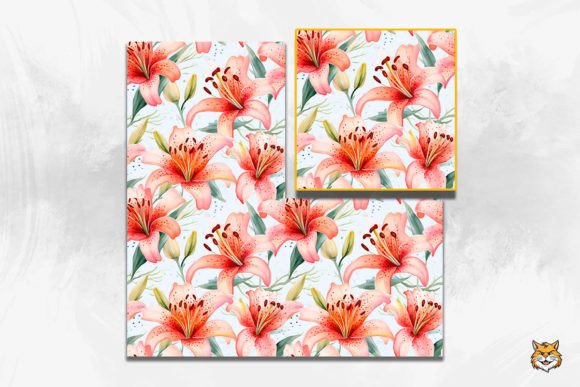
Watercolor Lily Seamless Pattern 2: A Practical Guide to Professional Application
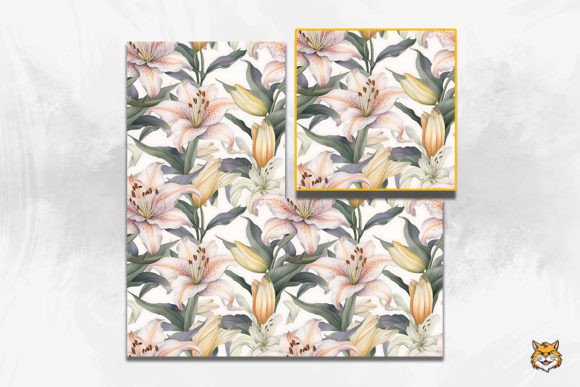
Integrating botanical elements into digital and print design requires more than simply dragging a file onto a canvas. The Watercolor Lily Seamless Pattern 2 offers a delicate, organic aesthetic that appeals to creators looking for elegance without sacrificing versatility. Whether you are designing wedding stationery, packaging for skincare products, or social media assets, this specific lily background provides a soft texture that photographs and renders beautifully. However, the difference between an amateur result and a professional finish often lies in how the asset is handled after download. Understanding the technical specifications and common application pitfalls ensures that your creative projects maintain the high quality intended by the original artwork.
Understanding Resolution and Print Integrity
One of the most frequent errors designers make when working with floral seamless patterns is assuming that screen resolution translates to print quality. This Watercolor Lily Seamless Pattern 2 is delivered at 300dpi, which is the industry standard for crisp printing. A common mistake occurs when users resize the 12x12 inch PNG file upward to fit larger formats like banners or wallpaper without checking the effective PPI. Stretching a raster image beyond its native dimensions introduces pixelation and blurriness, destroying the subtle watercolor gradients that define the lily aesthetic.
To avoid this degradation, always verify your document setup before placing the pattern. If you require a surface area larger than 12x12 inches, utilize the seamless tiling feature rather than scaling the single tile. Because this is a true seamless pattern, repeating the tile horizontally and vertically maintains consistent resolution across infinite surface areas. For large-format projects like wall murals or extensive wrapping paper designs, set your document to the final physical size first, then apply the pattern as a fill or defined brush. This preserves the 300dpi integrity and ensures the lily details remain sharp even when viewed up close.
Navigating Transparency and Background Layers
The inclusion of a PNG file in the zip bundle is significant because it supports transparency, yet many users overlook this advantage. A frequent oversight is treating the Watercolor Lily Seamless Pattern 2 as a flat JPEG with a locked white background. This limits flexibility, especially when creating layered compositions for invitations or web backgrounds where color customization is necessary. Placing a white-background pattern over a colored layer forces you to use blend modes that can muddy the colors or create unwanted halos around the floral elements.
Instead, leverage the transparent nature of the PNG. This allows you to place the lily seamless pattern over any solid color, gradient, or textured background without editing the source file. For example, if you need a "Lily 3D" effect or a specific seasonal colorway, simply adjust the hue/saturation of the underlying layer rather than altering the pattern itself. This non-destructive workflow saves time and keeps the original asset pristine for future projects. Always check the alpha channel upon opening the file to ensure transparency is intact; some software defaults may flatten the image on import if settings are not configured correctly.
Avoiding Visual Fatigue in Repetitive Designs
Seamless patterns are designed to repeat infinitely, but this strength can become a weakness if applied without restraint. When using the Watercolor Lily Seamless Pattern 2 for extensive surfaces like wallpaper or fabric wrap, beginners often default to 100% scale and maximum opacity. This creates a dense, chaotic visual field that competes with text and other focal points. The result is often overwhelming and reduces readability, particularly in graphic design contexts like business cards or website headers.
Professional application involves treating the pattern as a supporting element rather than the sole focus. Consider reducing the opacity to 40-60% when using the lily background behind typography. Alternatively, increase the scale of the pattern significantly so that only portions of the lilies are visible within the frame; this abstracts the design and creates a more sophisticated, less repetitive look. For scrapbooking or card making, use masking techniques to fade the pattern toward the center or edges, creating negative space for photos or messages. These adjustments prevent visual fatigue and ensure the lily motif enhances rather than dominates the composition.
Color Management Across Digital and Print Media
Watercolor art relies heavily on subtle tonal shifts, making color accuracy critical. A common frustration arises when the vibrant lilies seen on-screen appear dull or shifted in print. This discrepancy usually stems from ignoring color profiles. While the Watercolor Lily Seamless Pattern 2 is high-quality, monitors display in RGB while printers use CMYK. Simply converting the file without proofing can lead to unexpected results, particularly in the softer pinks and greens typical of lily illustrations.
Before sending any project to print, perform a soft proof using your printer’s specific ICC profile. This allows you to preview how the watercolor washes will translate to paper. If you are using the pattern for web backgrounds or social media banners, ensure your workspace is set to sRGB to maintain consistency across different devices. Do not assume the downloaded file is universally calibrated; always embed the correct color profile when exporting final deliverables. Taking this extra step prevents costly reprints and ensures the client or end-user sees the exact shade of lily you intended.
Strategic Asset Organization and Licensing
Efficiency in design is as important as aesthetic quality. Many creatives download the zip file, extract the PNG, and immediately rename it to something generic like "flower_pattern.png." Months later, when searching for a specific lily bundle or variation, they cannot locate the original high-resolution source. This leads to redundant purchases or wasted hours recreating similar assets. Proper digital asset management starts the moment you download the Watercolor Lily Seamless Pattern 2.
- Maintain Original Filenames: Keep the creator’s naming convention or append descriptive tags rather than replacing them entirely.
- Create Dedicated Folders: Store the 300dpi source files separately from working project files to prevent accidental overwrites.
- Document Usage Rights: Save licensing information alongside the asset. Knowing whether you can use the lily wallpaper for commercial client work versus personal scrapbooking prevents legal issues down the line.
- Tag Metadata: Use your operating system or DAM software to tag the file with terms like "lily seamless pattern," "watercolor botanical," and "wedding background" for instant retrieval.
Evaluating Suitability Before Purchase
Finally, avoid the mistake of purchasing based solely on the thumbnail preview. While the Watercolor Lily Seamless Pattern 2 is versatile, it may not suit every project. Before adding the lily bundle to your cart, zoom in on the preview to inspect edge blending. True seamless patterns should have no visible grid lines or abrupt color shifts where tiles meet. Check the style of the watercolor rendering; some are loose and impressionistic while others are detailed and botanical. Ensure the artistic weight matches your intended application. A heavy, saturated lily might overpower a minimalist business card, while a faint wash might disappear on dark fabric.
By approaching this asset with technical awareness and strategic intent, you transform a simple digital download into a powerful design tool. The goal is to let the natural beauty of the watercolor lily serve your creative vision effectively, avoiding the technical pitfalls that compromise quality. Whether you are crafting a single invitation or branding an entire product line, mindful application ensures your results are as polished and enduring as the flowers themselves.