Shadow Box Letters A-Z File Bundle Guide
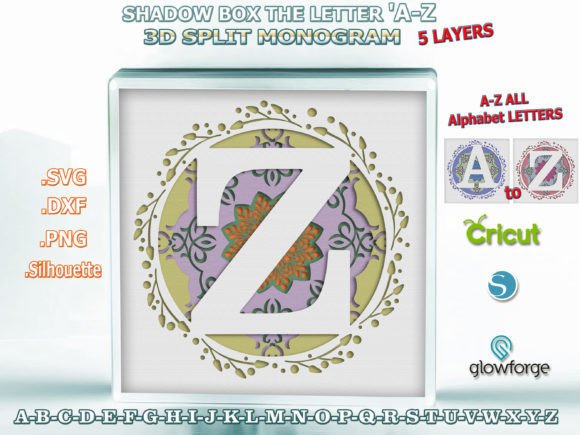
Creating dimensional paper art requires more than just a creative eye; it demands precise digital assets that translate seamlessly from screen to physical medium. The Shadow Box the Letters a-Z File Bundle serves as a comprehensive resource for crafters and designers looking to produce professional-grade 3D split monograms. This collection is not merely a set of alphabet files but a structured system designed for depth, layering, and visual impact. Each letter in this bundle features a distinct five-layer architecture that creates genuine dimensionality when assembled, moving beyond flat vinyl decals into the realm of sculptural paper engineering.
The visual personality of these designs balances modern typography with classic craftsmanship. Unlike standard display fonts or script fonts that rely solely on outline weight, these shadow box files utilize negative space and stacked planes to define form. The result is a clean, legible aesthetic that works equally well in nursery decor, wedding signage, or personalized branding materials. Because the design relies on structural layers rather than intricate ink details, it maintains readability even when scaled, making it a versatile asset for both digital previews and tangible products.
Technical Specifications and Format Versatility
One of the primary challenges in digital crafting is file compatibility across different ecosystems. The Shadow Box the Letters a-Z File Bundle addresses this by providing a robust multi-format package. The download includes SVG files optimized for Cricut Design Space and other die-cutting machines, ensuring smooth node paths without unnecessary anchor points that can cause cutting errors. For laser cutting enthusiasts, DXF files are included specifically for Glowforge and similar platforms, where line precision is critical for achieving tight friction fits between layers.
Silhouette Studio users receive native format files, eliminating the need for conversion that often degrades design integrity. Additionally, high-resolution PNG files serve dual purposes: they act as immediate visual previews for clients or personal project planning and function as printable references for alignment during assembly. The entire bundle spans 26 organized folders totaling approximately 100MB, keeping your workspace tidy and reducing the cognitive load when searching for specific letters during time-sensitive production runs.
The base cut size of 8.5 x 8.5 inches (21.5 cm x 21.5 cm) provides a substantial canvas for detailed work. However, the true value lies in the vector nature of these design assets. Whether you are creating miniature gift tags or large-scale wall art, the geometry remains crisp. This scalability is essential for entrepreneurs who need to offer product variations without purchasing multiple licenses or redrawing artwork. The five-layer structure is engineered to maintain proportional integrity, ensuring that the shadow depth remains visually consistent regardless of the final output size.
Strategic Resizing and Layer Management
While vector graphics are theoretically infinitely scalable, practical application in paper crafting requires mindful adjustment. When working with the Shadow Box the Letters a-Z File Bundle, increasing the size is generally straightforward; the design retains its ratio perfectly at 9x9, 12x12, or larger dimensions. Larger formats often enhance the 3D effect, allowing for thicker cardstock and more pronounced spacers between layers.
Reducing the design size, however, demands technical consideration. As dimensions shrink, thin elements within the five-layer stack may become too fragile for certain paper weights or cutting blades. Before committing to a smaller scale, always perform a test cut to evaluate structural integrity. If you are resizing for a specific frame, consider utilizing a square base layer that exceeds the dimensions of the letter layers themselves. This technique simplifies framing and provides a built-in matting effect that elevates the perceived value of the finished piece.
Because each layer exists as a separate file component, you have granular control over the assembly. This separation allows for color blocking and material mixing that would be impossible with flattened images. You might choose to use textured cardstock for the back layer, metallic paper for the middle accent layers, and premium white stock for the top face. This modularity transforms a simple alphabet set into a flexible brand identity tool, enabling consistent visual language across diverse product lines.
Workflow Optimization for Paper Crafting
Efficiency in production directly impacts profitability for small business owners and enjoyment for hobbyists. Establishing a standardized workflow with these files prevents common pitfalls associated with multi-layer projects. Begin by downloading the ALL_Files.zip and immediately saving it to a dedicated project directory on your computer. Unzipping the master file reveals the 26 individual letter folders, each containing the necessary SVG, DXF, PNG, and Silhouette formats.
Organization at this stage saves hours later. Rather than importing all 26 letters into your cutting software simultaneously, access only the specific folder needed for your current project. This keeps your software running smoothly and reduces the risk of selecting the wrong layer group. When preparing for paper cutting, verify that your blade depth and pressure settings are calibrated for the specific cardstock weight you are using. Five-layer shadow boxes typically require medium-to-heavy weight paper (65lb to 110lb cover stock) to prevent warping and ensure clean cuts.
Assembly is where the design truly comes alive. Use a low-tack adhesive or foam tape to separate layers, enhancing the shadow effect that gives the bundle its name. Align layers using the registration marks or outer boundaries inherent in the file design. For commercial creators, documenting your assembly process can also serve as valuable content for social media graphics or blog tutorials, further leveraging your purchase of these design assets.
Evaluating Fit for Creative and Commercial Projects
Determining whether the Shadow Box the Letters a-Z File Bundle aligns with your project goals involves assessing both aesthetic and functional requirements. This style excels in applications where tactile engagement matters. It is particularly effective for editorial design elements in physical publications, packaging design for luxury unboxing experiences, and personalized gifts that command higher price points due to perceived complexity.
From a branding perspective, these 3D split monograms offer a unique alternative to traditional logo design. While they may not replace a primary vector logo for web headers, they serve as exceptional secondary marks for merchandise, event signage, or limited-edition releases. The interplay of light and shadow creates a dynamic visual that static sans serif or serif fonts cannot replicate. When pairing these dimensional letters with other typographic elements, opt for simple, clean typefaces that do not compete for attention. Let the shadow box letter serve as the focal point, supported by understated complementary text.
Always review licensing terms before integrating these files into commercial products. Understanding the scope of use protects your business and respects the designer’s intellectual property. For marketers and content creators, these files also provide ready-made visuals for showcasing customization capabilities. Photographing the assembled layers in natural light highlights the premium quality of the design, helping to justify higher margins on finished goods. Ultimately, the success of this bundle lies in treating it not just as a font substitute, but as a specialized construction kit for dimensional art.