Cute Blue Baby Doll: Maximizing Quality in Digital Crafting Projects
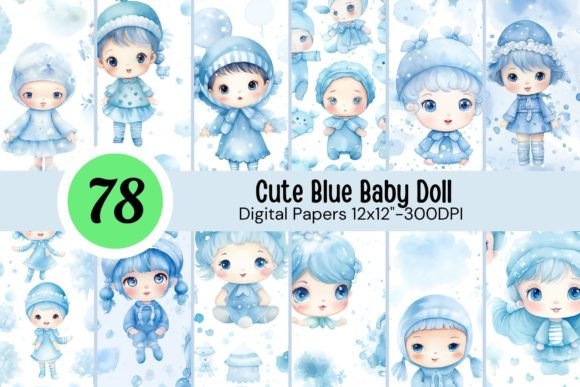
The appeal of a Cute Blue Baby Doll digital asset lies in its versatility and emotional resonance. For creators working on baby showers, nursery decor, or personalized gifts, this specific aesthetic bridges the gap between vintage nostalgia and modern design. When you acquire a collection featuring 78 high-resolution JPG files at 3600 x 3600 pixels, you are not just downloading images; you are securing a foundational library for diverse applications ranging from sublimation tumblers to KDP book covers. However, possessing high-quality assets is only half the battle. The difference between a professional finish and an amateur result often depends on how these files are managed, prepared, and applied.
Many crafters and designers overlook the technical nuances of working with 300 DPI raster graphics. While the resolution is ideal for print, assuming that every file will work perfectly for every project without adjustment is a common pitfall. Understanding the specific characteristics of these watercolor-style illustrations ensures that your final products—whether they are physical mugs, digital planner stickers, or large-format wall art—maintain the crispness and color fidelity intended by the original artwork.
Understanding Resolution and Print Size Limitations
A frequent misunderstanding involves the relationship between pixel dimensions and physical print size. The Cute Blue Baby Doll collection provides files at 3600 x 3600 pixels at 300 DPI. Mathematically, this translates to a maximum high-quality print size of 12 inches by 12 inches. This is perfect for scrapbooking pages, tumbler wraps, and standard photo prints. Issues arise when creators attempt to stretch these files beyond their native resolution for larger formats like posters or banners.
Upscaling a 300 DPI JPG file significantly can introduce pixelation, blurring, or artificial sharpening artifacts that degrade the soft, watercolor aesthetic essential to this theme. If your project requires dimensions larger than 12x12 inches, do not simply drag the corners in your design software. Instead, use specialized AI upscaling tools designed for illustration preservation, or utilize the image as a central element surrounded by complementary vector patterns or solid colors. This approach maintains the integrity of the doll illustration while allowing for larger compositions suitable for wall art or website backgrounds.
Color Management for Sublimation and Printing
Digital screens display color using RGB (Red, Green, Blue) light, while printers and sublimation processes use CMYK (Cyan, Magenta, Yellow, Key/Black) ink. A vibrant, glowing blue on your monitor may print as a dull navy or purple if not properly managed. Since these files are typically delivered in RGB JPG format for maximum screen compatibility, color shifting is a realistic concern for physical products like t-shirts, mugs, and packaging.
To avoid disappointing results, always perform a test print before committing to a full production run. For sublimation specifically, the blue tones in baby-themed artwork can be sensitive. Create a small color swatch chart using the specific blues from the Cute Blue Baby Doll set and press them onto your chosen substrate. Adjust your printer profile or ICC settings based on this physical test rather than trusting the screen preview. This corrective step saves money on wasted blanks and ensures the sentimental value of the design isn't lost to poor color reproduction.
Optimizing File Formats for Different Mediums
While JPG is a universal format, it is not always the optimal choice for every application listed in the product description. Relying solely on the base JPG file can limit your efficiency and quality in specific workflows. Recognizing when to convert or modify the file type is crucial for professional results.
- Stickers and Planner Assets: JPGs do not support transparency. If you use the raw square file for digital planners or printable stickers, you will have a white background box around the doll. Take the extra step to remove the background using masking tools or conversion software to create PNGs. This allows for seamless layering over journal pages or colored backgrounds.
- Tumbler Wraps and Mugs: Ensure you are accounting for bleed areas. A 3600px file might fit a 20oz skinny tumbler perfectly, but if your template requires seam allowance, you risk white edges after pressing. Always verify the wrap dimensions against the pixel count before printing.
- KDP and Book Covers: When using these illustrations for Kindle Direct Publishing, ensure the image meets the specific spine and gutter requirements. Centering a 12x12 square image on a rectangular book cover requires careful composition to avoid awkward cropping of the doll’s features.
- Social Media and Web: Using full-resolution 3600px files for Instagram or website backgrounds will slow down load times and may be automatically compressed by platforms, reducing quality. Resize these assets to platform-specific recommendations (e.g., 1080px wide) to maintain sharpness and performance.
Avoiding Composition and Scaling Errors
When designing invitations, cards, or party decorations, proportion is key. A common mistake is distorting the aspect ratio of the Cute Blue Baby Doll to fit a specific layout slot. Stretching a square image into a rectangle makes the subject look unnatural and unprofessional. Always lock the aspect ratio when resizing. If you need a rectangular shape, crop the image thoughtfully or place the square illustration within a frame element that matches your desired dimensions.
Additionally, consider the visual weight of the illustration relative to text. These watercolor designs often have soft edges that can get lost against busy backgrounds. For readability in invitations or announcements, ensure there is adequate negative space around the doll. Placing text directly over detailed parts of the illustration reduces legibility. Use semi-transparent overlays or solid blocks behind text elements to create contrast without obscuring the charming details of the artwork.
Evaluating Licensing and Commercial Viability
Before incorporating these assets into products for sale, such as tumblers, bags, or digital papers packs, thoroughly review the licensing terms associated with the download. "Great for commercial use" can mean different things depending on the creator. Some licenses allow for physical end-products but prohibit selling the digital files as standalone clipart or in competing digital paper sets.
Misunderstanding usage rights can lead to platform takedowns or legal issues. Clarify whether attribution is required or if there are limits on the number of units sold. For entrepreneurs building a brand around nursery or bridal themes, keeping organized records of your asset licenses is as important as the design work itself. This diligence protects your business and respects the intellectual property of the original artist.
Strategic Organization for Workflow Efficiency
With 78 files in a single pack, disorganization can quickly derail creativity. Do not leave these assets in a generic "Downloads" folder. Implement a tagging or naming system immediately upon acquisition. Categorize files by pose, expression, or accessory type. When you are mid-project creating baby shower invitations or junk journal spreads, being able to instantly locate "sleeping doll" versus "playing doll" saves significant time.
Furthermore, create derivative folders for modified versions. Keep your master 3600px JPGs pristine and untouched. Store resized web versions, transparent PNGs, and color-corrected print files in separate subfolders. This prevents accidental overwriting of high-resolution masters and streamlines the retrieval process for future projects. Efficient asset management transforms a simple download into a sustainable design resource, ensuring that the Cute Blue Baby Doll collection remains a valuable tool for years of creative endeavors.